Calling CRM · Outbound sales teams
Dialus: Call, email and close from one screen.
Dialus is the CRM your reps actually call from. Outbound and inbound calls in the browser, a real two-way email inbox, SMS and WhatsApp and a drag-and-drop pipeline — with every conversation saved to the right lead, automatically.

Drag a deal between stages and the lead updates itself
desk phones needed
ways to reach a lead — call, email, text
carriers supported, or use our numbers
record with the whole conversation
Why teams switch
Stop running sales across five tools.
Most outbound teams juggle a dialer, a spreadsheet, a mailbox, WhatsApp on a personal phone and a notebook. None of them agree, and every handover loses the story.
Showing work without Dialus: five separate tools.
- Dialer appCopy-paste every number
- Lead spreadsheetWho called them last?
- Separate mailboxThreads nobody else sees
- WhatsApp on a personal phoneLeaves with the rep
- Notebook & sticky notesOutcomes never logged
See it work
Watch one call do five jobs.
The rep clicks a number, talks, and picks an outcome. Everything else — the log, the pipeline, the meeting and the follow-up — happens on its own.
Step 1 of 6: Pick a lead.
Lead
Northside Auto Finance
Jordan Patel · Owner
- City
- Surrey, BC
- Stage
- Contacted
- Last call
- Never called
Pipeline
Contacted
Interested
Browser dialer
Dialer ready — no desk phone, no app
Done automatically
- Call loggedWaiting for the call to end…
- Stage movedWaiting for the call to end…
- Meeting bookedWaiting for the call to end…
- Follow-up text sentWaiting for the call to end…
Illustration with sample data.
What it does
8 modules, one product
Pick a module to see the real screens and what it does for your team.
Dial from the browser, not a desk phone
Reps call straight from the lead they are looking at. The browser is the phone, and when the call ends it is already written onto the record.
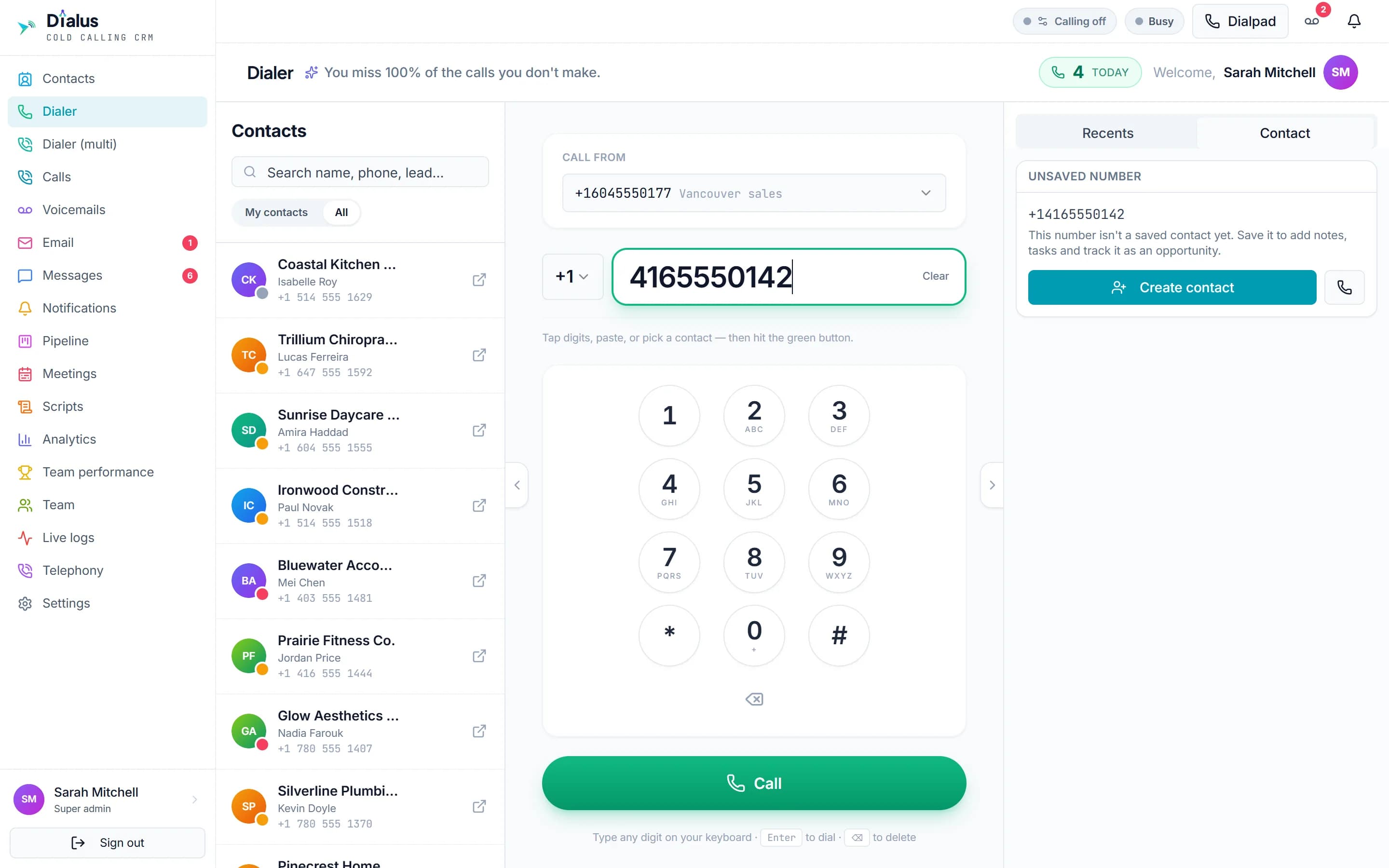
Dial from the browser with the caller ID you choose
One click from lead to ringing
Click any number, or type it on the keypad and press Enter. Pasted numbers are tidied up automatically.
Local caller ID per call
Call a Toronto lead from a Toronto number and a Vancouver lead from a Vancouver one — local numbers get answered.
Logged without typing
Duration, direction, recording and outcome — Meeting set, Callback, Not interested — saved the moment you hang up.
- Mute, hold and a keypad for phone menus
- One-click redial from recent calls
- Recordings with an inline player
- Works with Twilio, Telnyx or Zoom Phone
AI lead analyst
Know who you're calling before it rings.
One click runs a live pre-call audit of the business and writes a warm, 30-second opener for that exact lead — so every rep sounds like they did their homework.
- Your facts win. Anything a rep has verified is treated as true — the analyst adds and flags, never overwrites.
- Picks the right playbook. Market leader, invisible online, or somewhere between — the pitch changes to match.
Lead
Harbourview Dental Studio
- Halifax, NS
- 4.7 · 120+ reviews
- Website, no booking
- Owner verified by rep
Pre-call brief
Sample outputScenario: Strong reputation, weak website — 4.7★ from 120+ reviews, but the site has no online booking and is slow on phones.
What they do: Family dental studio in Halifax, NS. Two dentists, open Saturdays, known for nervous-patient care.
30-second opener: “Hi Dr. Morgan — your Google reviews are some of the best in Halifax, but anyone booking from a phone hits a dead end. We help practices turn that traffic into booked chairs. Worth ten minutes this week?”
Who it's for
Built for everyone on the sales floor
Each person sees the part of Dialus that fits their job — and nothing they shouldn’t.
Reps on the phones
Dial, talk, move on.
Click a number and the browser rings. Scripts open beside the call, the AI brief says who you are calling, and the outcome you pick fills in everything else.
- Click-to-call from any record
- Scripts and an AI brief mid-call
- The outcome logs the call for you
Live analytics
See the whole floor while it's happening.
Calls, connects, meetings and revenue for every rep — plus the hours your leads actually pick up. Spot a slow week on Tuesday, not at month-end.
Calls today
0
Connect rate
0
Meetings set
0
Won this month
0
Team leaderboard
- 01Sarah M.212
- 02Omar B.198
- 03Lina C.176
- 04Priya S.161
- 05Ethan R.142
Best time to call
Connect rate by hour · hover a cell
Sample data for illustration.
A look inside
This is the actual software
Not mock-ups — real screens from the live product, with any personal details blurred or made up. Open any screen to see it full size.
On the phone
The whole CRM in your pocket
Every screen works on a phone, and Dialus installs to the home screen like an app. Reps call, text, email and update leads between meetings.
- Calls from the phone’s browser
- Push notifications for inbound and messages
- Nothing cut down from desktop


Security
Your customers’ details, kept safe
Phone numbers, records and recordings are sensitive. Here is how Dialus looks after them, in plain words.
Each company kept separate
Your leads, calls and emails are walled off from every other workspace.
Credentials locked away
Carrier and mailbox credentials are encrypted at rest — nobody can read them back.
Only what each job needs
Roles and data access decide who sees which leads and settings.
A record of who did what
Support access is logged, and anyone can be signed out of every device at once.
Getting started
Live in days, not months
- Step 01
Book a demo
Thirty minutes on the running product, shaped around how your team sells today.
- Step 02
We set you up
Your workspace, your numbers or ours, your mailbox connected and your leads imported.
- Step 03
Invite the team
Everyone gets the role that fits their job. Reps are calling the same day.
Book a demo
See Dialus running on your leads.
Tell us a little about your team and we’ll reply with times. No drip campaign — one email to book the call.
- Thirty minutes, liveThe running product, not a slide deck — driven the way your team sells.
- Bring your awkward casesNumbers in several cities, a shared mailbox, reps who only see their own leads.
- Pricing on the callBased on team size and whether you bring your own numbers.
- Straight answers on securityHow your data is kept separate, who sees what, and what happens if you leave.
Prefer email? Write to hello@invoxol.com and we'll reply with times.
Built and supported by invoXolQuestions
Questions people ask us
Do reps need a desk phone or a separate softphone app?
No. Dialus places and receives calls in the browser. If a rep can open Dialus, they can call — all they need is a headset.
Can we keep our own phone numbers and carrier?
Yes. Connect your own Twilio, Telnyx or Zoom Phone account and keep the numbers you have, or ask us for numbers. Each call can go out from whichever number you choose.
Does email work with our existing mailbox?
Yes. Dialus connects to your Gmail, Outlook or business mailbox, so emails leave from your own address and replies come back into Dialus. Your mailbox keeps working as before.
Can reps work from their phone?
Yes. Every screen works on a phone and Dialus installs to the home screen like an app, so reps can call, text, email and update leads on the move.
How do we control what each person can see?
With roles. Four are ready to use and you can create your own, then adjust a single person and decide whose leads each person can see.
Can we import our current leads — and export them later?
Yes. Import a spreadsheet to get started and export whenever you like. Your data is yours.
Who builds and supports Dialus?
invoXol designs, builds and runs Dialus. When you need help you reach the engineering team that wrote it, not a reseller.
How much does it cost?
Pricing depends on team size and whether you bring your own numbers, so we cover it on the demo call rather than publish a list price that fits nobody.
Designed, built and run by invoXol.
Dialus is ours — not a resold platform. The people who answer your support email are the engineers who wrote it, and the same team builds custom software for clients across Canada, the USA and beyond.
